Reports
The Web Admin reports how primedocs is used: as key figures on the start page and, under Analytics, as the Version Overview of the clients and as the usage statistics of the templates. The pages under Analytics are visible to system administrators and developers.
Start page
For the selected datasource, the start page shows:
| Key figure | Meaning |
|---|---|
| Documents / week | Documents created in the last completed week compared with the previous week |
| Active users / 30 days | Distinct users from whom at least one client has reported in the last 30 days |
| Client versions | Number of reported combinations of client type and version |
Below them, the start page lists at most ten most-used templates of the last twelve completed weeks and the quick access to the areas released for one's own roles. Key figures for which one's own roles are not sufficient are shown as «No permission». The list of most-used templates is then not shown.
Version Overview
The Version Overview shows which versions the clients report and which desktop clients run a lower version. It is based on the reports sent by the clients, described under Client usage.
- Active users: distinct users with client contact in the last 7, 30 and 60 days.
- System versions: the version of the primedocs server, the highest recorded version of the web client, the manifest versions of the Teams app, the Office add-in and the Outlook add-in, and the versions of the desktop clients. Manifest versions are marked as «provisional».
- Desktop versions: share of recorded desktop clients on the highest recorded desktop version and an assessment of the version spread.
- Desktop clients in detail: grouped by version or by computer. An opened row shows users and computers or the recorded versions. In the view by computer, the «Lower versions» filter shows the computers that are not on the highest recorded version.
The highest version is determined per client type, so desktop and web clients are not compared with each other. There is no comparison with a published version, and clients without a reported version do not count as outdated. Versions whose last recorded contact is more than 30 days ago are marked as «not seen recently». All tables can be exported as a CSV or Excel file.
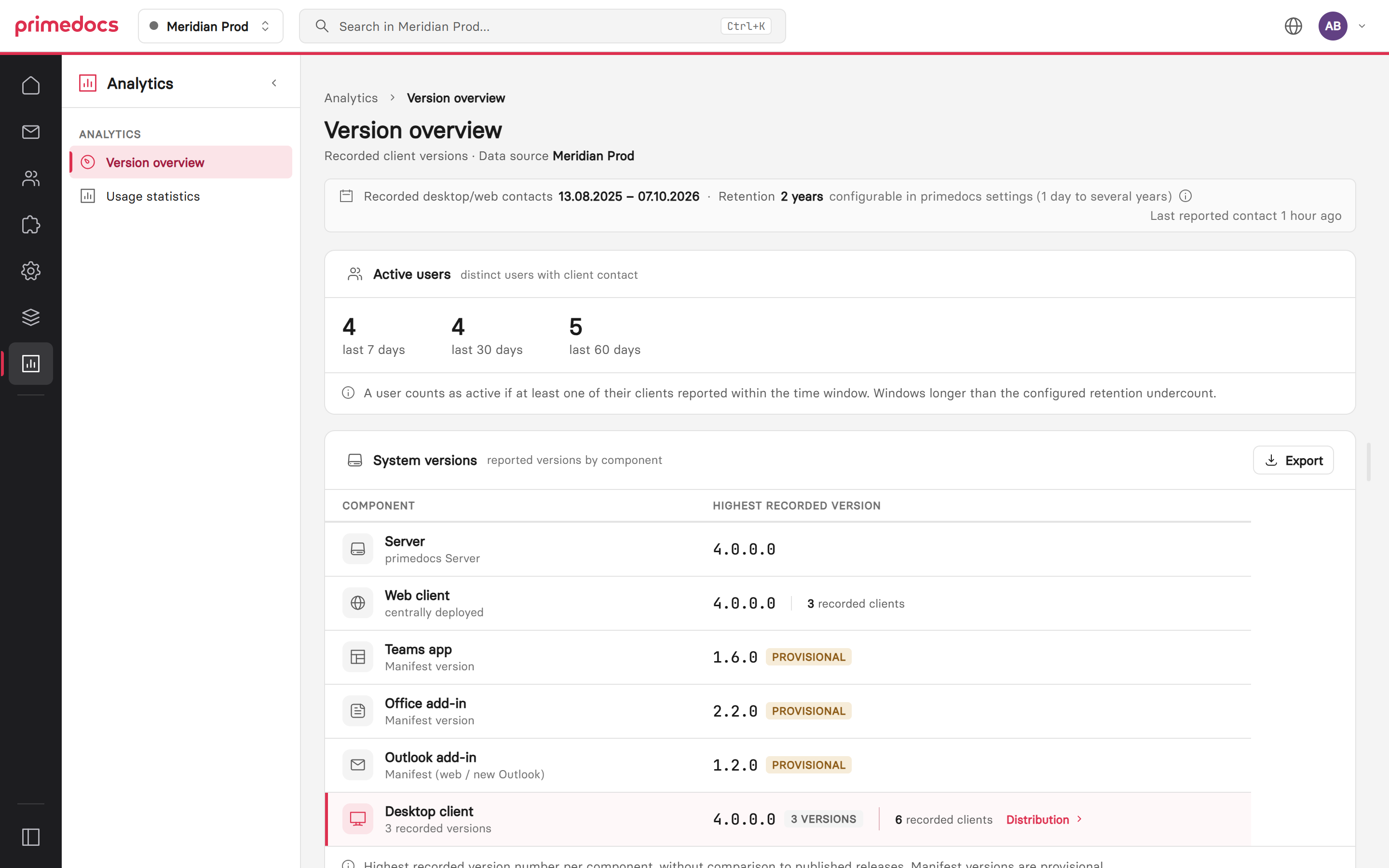
The Version Overview shows the active users and the recorded versions of the system components.
Usage statistics
The usage statistics show the documents created from templates for a period of 30 days, 90 days or 12 months. The detail table can be grouped by template, template group or organizational unit. An opened row shows the breakdown, for templates for example by organizational unit and document language.
A document counts as created when a template was opened. This is the same counting method as in the statistics of the DataSourceAdminApp. Deleted templates remain included with the note «deleted» or «no longer available». Organizational unit and document language are recorded only when documents are created.
The basis is the log entries of template usage. A configured retention period limits how far back the statistics reach.