Modules
primedocs is made up of several modules. What matters for daily work are the access points, the places where primedocs is visible to you. Behind them sit the modules in the background that provide templates, produce documents and connect other systems.
Your organisation decides which modules it uses. The route to a document is the same everywhere: choose a template, fill in the fields, create.
Access points for users
| You work … | This is … | Typical for |
|---|---|---|
| in the browser at your organisation's primedocs address | primedocs Web | Creating documents from anywhere, including tablet and mobile phone |
| in a Windows program called primedocs | primedocs Desktop | The office workplace, with the full feature set in Word, Outlook, PowerPoint and Excel |
| in Word, Outlook, PowerPoint or Excel with a primedocs ribbon tab | Office COM add-in, part of primedocs Desktop | Finishing a document after creation, inserting snippets, choosing signatures |
| in Word, Excel or PowerPoint with a primedocs button that opens a side pane (in the browser, on Windows or on a Mac) | Office web add-in | Creating documents from templates without primedocs Desktop |
| in new Outlook with a primedocs button when writing and when reading a message (in the browser, on a Mac and on mobile) | Outlook web add-in | Signatures and snippets in new Outlook, including on the move |
| in Microsoft Teams, SharePoint or your business system | Integration of primedocs Web | Creating documents right where they are filed |
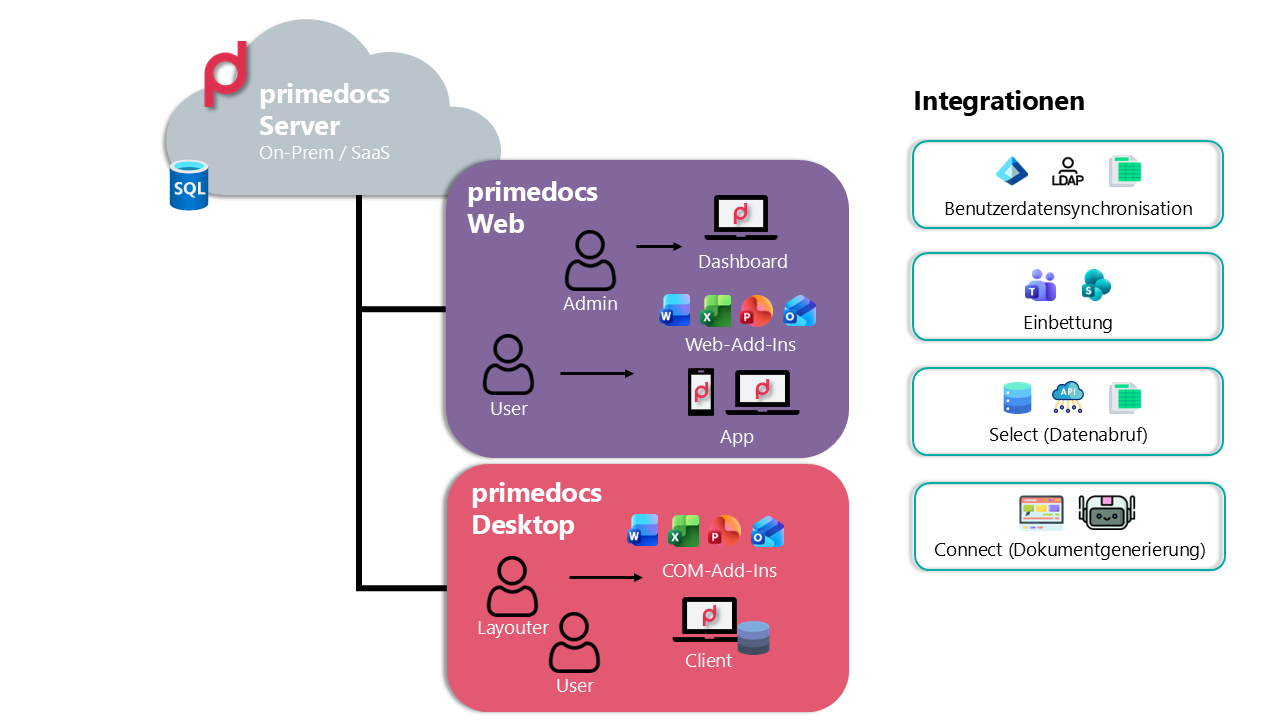
Every guide in this documentation first states which access point it applies to. Where a procedure differs between primedocs Web and primedocs Desktop, both routes stand side by side. How the individual interfaces are laid out is shown in Reference.
Modules in the background
Your IT department sets these modules up. As a user you never deal with them directly, but they explain where the templates, addresses and finished documents come from.
| Module | What it does |
|---|---|
| primedocs server | Keeps templates, profiles and shared snippets centrally available. primedocs Web and the add-ins fetch them as needed. primedocs Desktop additionally holds a local copy so you can work without a connection. |
| Document Creation Server (DCS) | Produces documents on the server without anyone at a workplace being involved. It is always triggered by another system through Connect, whether for a single document or for a whole batch. |
| Connect | Starts document creation from a business system (records management such as CMI or Fabasoft, ERP, CRM). See Starting from a business system. |
| Select | Pulls recipient addresses and master data from third-party systems into the document, so nothing has to be typed out. |
| Web API | The interface for your own integrations with primedocs. |
| MCP server | Opens primedocs up to AI agents, such as Microsoft 365 Copilot or other MCP-capable assistants. |
| Web admin | The interface where your administrators manage users, groups, roles and organizational units. |
Technical detail on these modules is in the System Overview in the Operations section.